

Choosing the right Touch Display is an important decision for designers, creators, and professionals who rely on visual precision and smooth interaction in their daily workflow. With the rapid development of digital tools, modern displays are no longer just output screens—they have become interactive, creative hubs. A high-quality Touch Display can significantly improve productivity, accuracy, and user experience, while a poor one can slow down work and cause frustration. Therefore, understanding the essential features before purchasing is crucial. This article explores the key aspects that define a reliable Touch Display and explains how each feature impacts real-world creative performance.
Screen Quality and Visual Performance
The foundation of any professional Touch Display is its visual performance, as it directly affects design accuracy and viewing comfort.
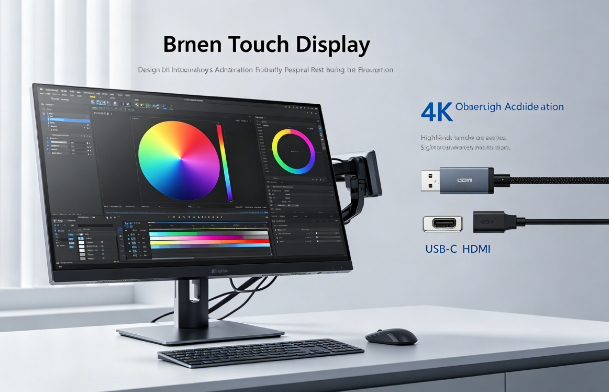
- Resolution clarity: A higher resolution, such as 2K or 4K, ensures sharper images, making it easier to work on detailed designs like illustrations, UI layouts, or photo editing. Lower resolution screens may cause pixelation and reduce precision.
- Color accuracy and gamut: Professional creators should look for displays with strong color coverage, such as 100% sRGB or Adobe RGB. This ensures that colors remain consistent across different devices and print outputs.
- Brightness and contrast balance: A well-calibrated screen improves visibility in different lighting environments and helps distinguish subtle tonal differences in creative work.
- Viewing consistency: Wide viewing angles ensure that colors and brightness remain stable even when viewed from different positions, which is important in collaborative environments.
Overall, strong visual performance ensures that the Touch Display delivers accurate and reliable image representation for professional work.
Touch Responsiveness and Input Precision
One of the most important aspects of a Touch Display is how accurately and smoothly it responds to user input.
- Low latency response: A high-quality screen should register touch or stylus input instantly, minimizing delays between action and display reaction. This is essential for drawing and detailed editing.
- Multi-touch capability: The ability to recognize multiple gestures allows users to zoom, rotate, and navigate seamlessly, improving workflow efficiency.
- Stylus sensitivity levels: Advanced models support thousands of pressure levels, enabling fine control over brush strokes, line thickness, and shading intensity.
- Palm rejection technology: Good systems can differentiate between intentional stylus input and accidental palm contact, preventing unwanted marks while drawing.
These factors determine how natural and fluid the interaction feels, which directly affects creative productivity and accuracy.
Ergonomics and Physical Design
Beyond performance, the physical design of a Touch Display plays a major role in long-term comfort and usability.
- Adjustable stand flexibility: Users should be able to tilt, rotate, or even switch between vertical and horizontal modes depending on their workflow needs.
- Eye comfort features: Anti-glare coatings and blue light reduction technologies help reduce eye strain during long working sessions.
- Build stability: A solid and stable structure ensures that the screen does not wobble during touch or stylus use, which is especially important for precision tasks.
- Cable and workspace organization: Well-designed ports and cable management systems help maintain a clean and efficient working environment.
A comfortable setup allows creators to work longer without fatigue, making ergonomics a key factor in choosing the right device.
Compatibility and Software Integration
A powerful Touch Display must integrate smoothly with creative software and operating systems to ensure efficient workflows.
- Operating system compatibility: The display should work seamlessly with Windows, macOS, or other systems without requiring complex drivers.
- Software optimization: Popular creative tools like Photoshop, Illustrator, and video editing platforms should support touch gestures and stylus input fully.
- Driver stability and updates: Regular updates ensure long-term compatibility and fix potential performance issues or bugs.
- Connectivity options: USB-C, HDMI, or DisplayPort support allows easy connection to laptops, desktops, or external devices without performance loss.
Strong compatibility ensures that users can fully utilize the capabilities of a Touch Display without technical limitations.
Durability and Long-Term Value
Investing in a Touch Display also requires considering its durability and long-term performance reliability.
- Scratch-resistant surface: High-quality glass or protective coatings help prevent damage from repeated stylus use or cleaning.
- Heat and usage stability: A reliable display should maintain consistent performance even during long hours of operation.
- Warranty and support: Strong after-sales service ensures that any technical issues can be resolved quickly, protecting the investment.
- Upgrade potential: Some models offer firmware updates or modular compatibility improvements, extending their usable lifespan.
These factors determine whether the device remains efficient and valuable over time, especially for professional users.
Conclusion
In conclusion, selecting the right Touch Display requires careful evaluation of multiple factors, including screen quality, touch responsiveness, ergonomics, software compatibility, and long-term durability. Each feature plays a vital role in shaping the overall user experience and productivity level. For designers and creators, a well-chosen Touch Display can significantly enhance workflow efficiency, creative precision, and comfort. However, the best choice ultimately depends on individual needs, budget, and usage intensity. By understanding these key features, users can make a more informed decision and invest in a display that truly supports their creative goals.